
Quick Filtering for Gmail
Bulk email filtering, simplified
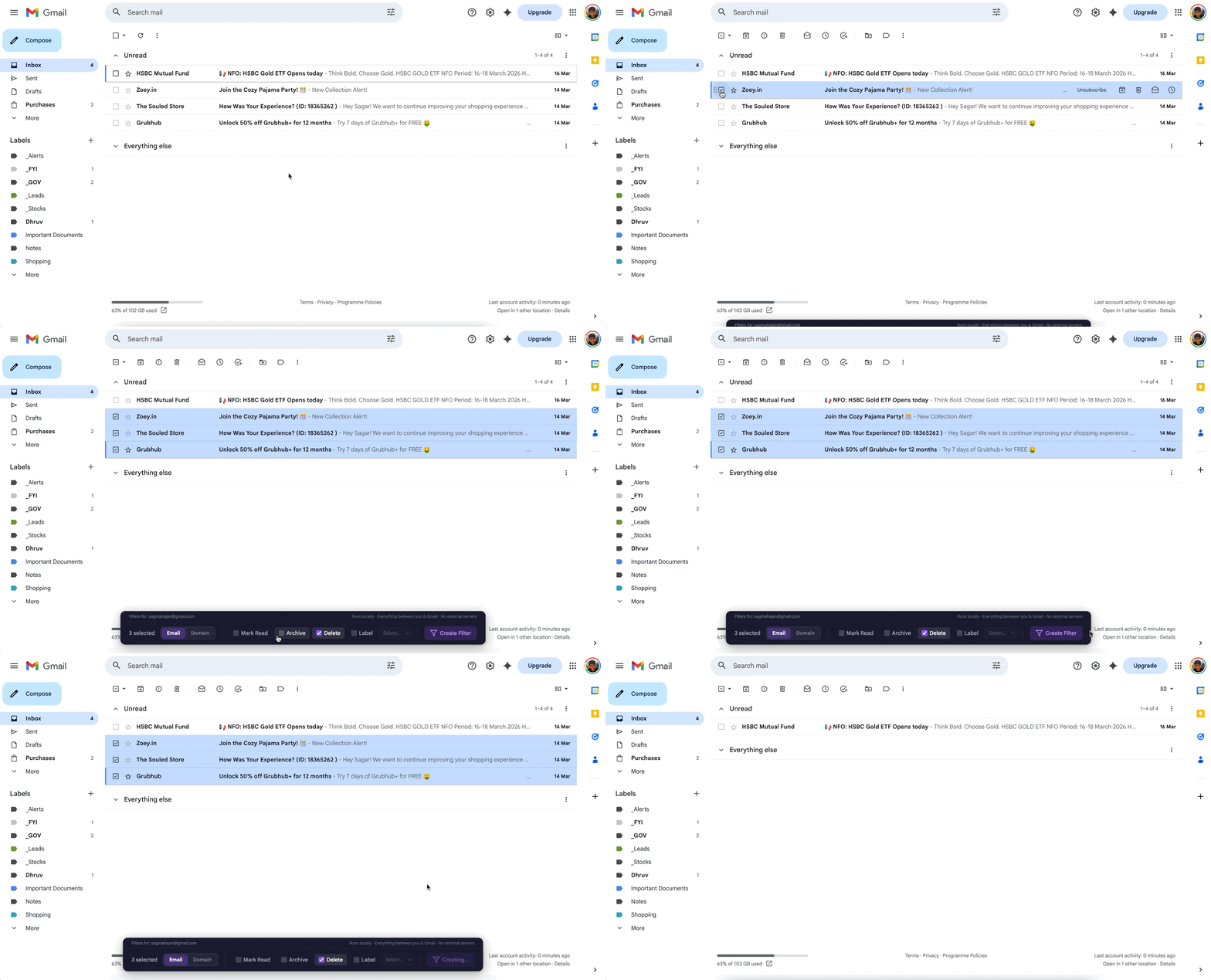
Select multiple emails in Gmail, pick an action, and create a filter for every sender in one click. No settings pages, no repetition.
Gmail Filters Are Powerful. Finding Them Is Not.
Gmail lets you create filters that automatically archive, label, delete, or mark emails as read. They're incredibly useful — if you can find them.
The filter creation flow is buried behind Settings → See all settings → Filters and Blocked Addresses → Create a new filter. That's four clicks before you even start. And there's no way to select multiple senders from your inbox and filter them all at once.
You're left doing it one by one, each time navigating that same buried menu. It's tedious, it's slow, and it's why most people just give up and let their inbox pile up.
Gmail Filter Manager fixes that.
Everything You Need. Nothing You Don't.
Built for one thing: making Gmail filters ridiculously easy to create.
One-Click Filter Creation
Select emails in your inbox, choose an action, and click one button. A permanent Gmail filter is created instantly. No settings pages, no forms.
Bulk Actions
Mark as read, archive, delete, or label — apply any action to multiple senders at once. Handle dozens of unwanted senders in seconds.
Domain-Level Filtering
Block entire domains with wildcard filters (*@domain.com). Common providers like gmail.com and outlook.com are automatically blocked to protect real mail.
Smart Filter Merging
Automatically merges new senders into existing filters for the same action. Handles Gmail's per-filter criteria limit by splitting when needed.
Applies to Existing Emails
Filters aren't just for future emails. Gmail Filter Manager applies your chosen action to matching emails already sitting in your inbox.
Multi-Account Support
Works seamlessly with multiple Gmail accounts. The extension detects which account is active and manages filters for that account automatically.
Filter Group Management
Organize your filters into logical groups. Keep your filter list clean and manageable even as it grows.
Create Labels On-the-Fly
Need a new label for your filter? Create it right from the extension toolbar — no need to switch to Gmail settings.
Visual Feedback
Filtered emails fade out and unbold in real time. Toast notifications confirm every action. You always know exactly what happened.
Three Steps. That's It.
No tutorials needed. If you can check a box, you can use Gmail Filter Manager.
Select Emails
Check the boxes next to emails in your inbox. The Gmail Filter Manager toolbar appears automatically.
Choose Your Action
Pick what you want: mark as read, archive, delete, or apply a label. Toggle between email and domain filtering.
Click "Create Filter"
One click. A permanent Gmail filter is created and applied immediately — to future emails and existing ones.
That's not a flag for later or a snooze.
It's a permanent Gmail filter — built into Gmail itself. It works whether the extension is installed or not.
Your Emails. Your Data. Your Machine. Period.
We built Gmail Filter Manager with a simple rule: your data never leaves your browser.
Zero servers
The extension runs entirely in your browser. There is no backend, no cloud service, no server of any kind.
Only talks to Google
The only network requests go to googleapis.com — Google's own API. Nothing else. No third-party services, ever.
Bank-grade authentication
Uses OAuth 2.0 with PKCE for authentication. Your credentials are handled by Google's own auth flow, never by us.
All data stays local
Account tokens and settings are stored in Chrome's local storage on your machine. Nothing is synced, uploaded, or shared.
No tracking at all
No analytics, no telemetry, no tracking pixels, no usage data collection. We literally have no way to know you're using it.
Open source
The full source code is on GitHub. Every line is auditable. You don't have to trust us — you can verify.
Questions? We've Got Answers.
Nothing leaves your browser. Gmail Filter Manager processes everything locally using the Gmail API. No data is sent to any external server, ever. The extension only communicates with googleapis.com to create and manage your filters.
Yes. Gmail Filter Manager works with both personal Gmail accounts and Google Workspace (formerly G Suite) accounts. As long as you can access Gmail in Chrome, the extension will work.
Absolutely. Gmail Filter Manager supports multiple Gmail accounts. It detects which account is currently active and manages filters for that account. You can switch between accounts in Gmail and the extension follows along.
Filters created by Gmail Filter Manager are standard Gmail filters. You can manage or delete them from Gmail's Settings > Filters and Blocked Addresses, just like any other filter. The extension creates native Gmail filters — there's no vendor lock-in.
Yes — when you create a filter, Gmail Filter Manager applies the action to matching emails that are already in your inbox. For example, if you choose to archive emails from a sender, existing emails from that sender will also be archived.
Gmail has a built-in limit of 1,000 filters per account. Gmail Filter Manager includes smart filter merging to help you stay under that limit by combining filters for the same action. The extension also handles Gmail's per-filter criteria limit by splitting large filters automatically.
Yes, 100% free. Gmail Filter Manager is open-source under the MIT License. There are no premium tiers, no subscriptions, no ads, and no data collection. It's a community project built to solve a real problem.
Email mode creates a filter for the exact email address (e.g., [email protected]). Domain mode creates a wildcard filter for every address at that domain (e.g., *@company.com), so you'll filter everything from company.com regardless of which specific address sends it.
Filtering common email providers like gmail.com, outlook.com, or yahoo.com at the domain level would catch legitimate emails from real people. Gmail Filter Manager blocks this to protect you from accidentally filtering important personal correspondence. You can still filter individual email addresses from these providers.
Gmail Filter Manager creates the same native Gmail filters — but without the pain. Gmail's built-in filter creation requires navigating to Settings, finding the right page, filling in a form, choosing actions, and confirming. With this extension, you just check some emails, pick an action, and click one button. It also adds bulk filtering, smart merging, and domain-level blocking that Gmail doesn't offer out of the box.
The extension requires access to Gmail's API (to create and manage filters), identity permissions (for OAuth authentication), and access to mail.google.com (to show the toolbar in Gmail). It does not request access to any other websites or data. All permissions are the minimum required for the extension to function.
Get Started in Seconds
- 1
Install the extension
Add to Chrome from the Web Store - 2
Open Gmail and select emails
Check the boxes next to emails you want to filter. The toolbar appears automatically.
- 3
Pick an action and click “Create Filter”
Done. A permanent Gmail filter is created and applied to all existing emails too.